MCP Integration: Connecting to External Systems
Right now, Claude Code can only see files on your computer.
But what if you need Claude to:
- Browse a website to find information?
- Check the latest documentation for a library?
- Query a database?
- Access an API?
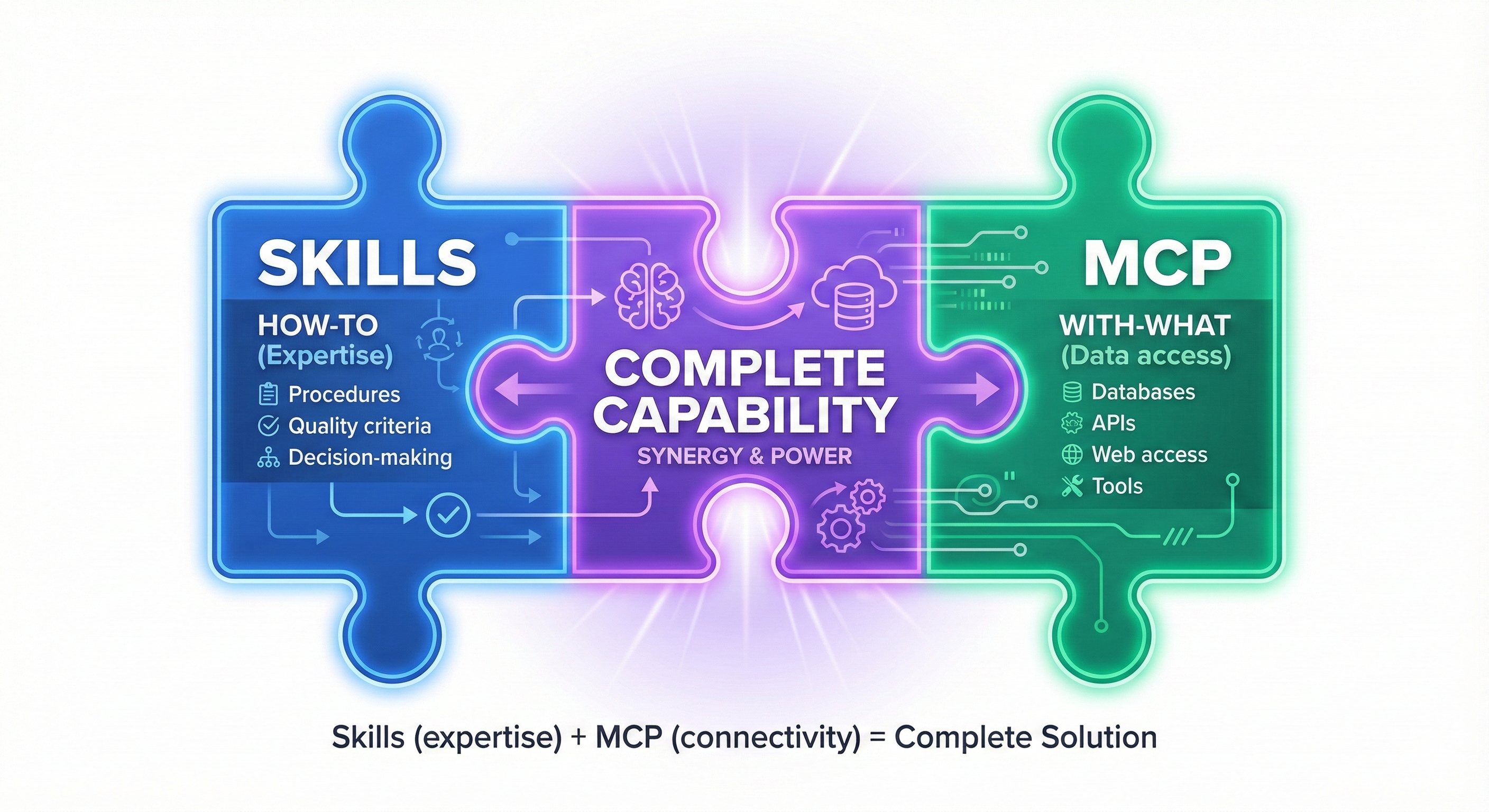
Skills (Lessons 5-9) taught Claude how to do things. MCP teaches Claude where to find outside information.
All of that data lives outside your computer. Claude Code can't reach it... yet.
Model Context Protocol (MCP) solves this problem. It's like giving Claude Code safe, approved access to the outside world.
Think of MCP Like This
Imagine Claude Code is a brilliant assistant who works in your office (your computer).
Without MCP: Your assistant can only use what's in the office—files on your desk, folders in your cabinet. That's it.
With MCP: You give your assistant a phone directory with approved contacts—a web browser expert, a documentation specialist, a database consultant. Now when your assistant needs outside information, they can call the right expert and get answers safely.
MCP is that phone directory. It connects Claude Code (your AI agent) to external tools and data sources in a standardized, safe way.
In This Lesson
You will:
- Add two beginner-friendly MCP servers to Claude Code
- Try real workflows: browse Amazon, fetch docs
- Understand when you need external access
No programming experience required. Just copy, paste, and see it work.
A Note on Security (Read This First)
Why security matters with MCP: Unlike working with local files, MCP servers can access the internet, APIs, and external systems. This is powerful but requires trust.
Stay safe:
- Use trusted MCP servers. In this lesson we'll use two widely used, reputable servers: Playwright MCP and Context7 MCP.
- Your tokens and secrets are stored in your system keychain (not plain text).
- Never paste secrets into files; use prompts when Claude asks or environment variables.
Hands-On: Add Two Helpful MCP Servers
We'll add two servers using simple commands.
What's happening: You're telling Claude Code about two external helpers it can use. Each command registers an MCP server that Claude can invoke when relevant.
Workflow 1: Shop Together — Find a Shirt on Amazon (Playwright MCP)
Goal: Ask Claude to browse Amazon and find a shirt that matches your preferences. No code—just a plain request.
In Claude Code, say:
What happens:
- Claude launches the Playwright MCP to visit Amazon
- It navigates pages, extracts details, and returns a neat summary with links
- You can iterate naturally: "filter to long-sleeve" or "show only Prime-eligible"
Expected Output Example:
Claude will return something similar to this (content varies by what's available):
Note: Real results vary by region, availability, and when you run this. Amazon changes its page structure frequently, so Claude adapts its browsing steps. The format (links, prices, ratings) stays consistent.
If you get an error:
- Ensure playwright MCP is registered: claude mcp list
- Try again; websites change often, so Claude may adjust its browsing steps
- Verify your internet connection is stable
Workflow 2: Learn What's New — Ask for MCP Docs (Context7 MCP)
Goal: Ask Claude to use Context7 to fetch and summarize the latest resources about MCP in Claude Code.
In Claude Code, say:
What happens:
- Claude queries Context7's knowledge sources for up-to-date docs
- You get a short, current summary with citations and links
- Ask follow-ups: "show the exact CLI command to add a server via stdio" or "compare Context7 MCP vs GitHub MCP"
Expected Output Example:
Claude returns something like (real docs are current, not from memory):
Example—Playwright:
Verify installation:
Recent Changes (2026)
- Stdio transport is now the default (network-based was beta in 2025)
- Permission model: Explicit allow-list per server in CLAUDE.md
- Context7 expanded to 200+ library documentation sources (50 in 2025)
- GitHub MCP now supports searching PRs and issues
Best Practices (from official docs)
-
Use allow-list configuration—only approve servers you trust
-
Test MCP servers in isolated projects before production
-
Keep servers updated: claude mcp update --all
-
Never store secrets in MCP commands—use environment variables
Official Resources
- Main docs: https://modelcontextprotocol.io/docs
- Getting started: https://modelcontextprotocol.io/docs/getting-started
- Server implementations: https://github.com/modelcontextprotocol
Note: Context7 fetches live documentation, so you always get the most current information. This beats searching Google and sifting through 10 outdated blog posts.
Tip: This is your "know about anything new" button. Use it anytime you need the latest docs without hunting across websites.
Understanding MCP: The Bigger Picture
Now that you've tried MCP in action, let's understand the concepts more deeply.
Skills + MCP: Expertise Packs Meet Data Pipes
Here's a powerful mental model from Anthropic:
Skills are Expertise Packs: They encode your procedures, your quality criteria, your domain knowledge. "How to analyze financial statements according to our Q4 risk framework."
MCP provides Data Pipes: They connect those expertise packs to live data sources. Your SQL database. Your Jira board. The web.
Together: Claude knows HOW to do something (skill) and has access to WHAT it needs (MCP).
Example: A skill encodes your company's financial reporting procedures. An MCP server connects Claude to your accounting database. Result: automated reports that follow your exact standards using real-time data.
What MCP Unlocks
The pattern: Without MCP, you're the bottleneck. With MCP, Claude Code becomes your autonomous partner.
💬 AI Colearning Prompt
"Explain how MCP provides safe external access compared to direct API calls. What security model does MCP use to protect user data?"
How Claude Code Manages MCP Tools
When you add MCP servers, Claude Code doesn't just connect to them—it intelligently manages how tool definitions are loaded.
The Challenge: Tool Definition Overhead
Each MCP server comes with tool definitions—descriptions of what each tool does, its parameters, and expected outputs. With multiple servers, these definitions can consume significant context:
- Playwright MCP: ~5,000-8,000 tokens of tool definitions
- Context7 MCP: ~3,000-5,000 tokens
- GitHub MCP: ~8,000-12,000 tokens
With 5 servers installed: 25,000-40,000 tokens before you've asked a question.
The Solution: MCP Tool Search (Built-In)
Since January 2026, Claude Code 2.1.7+ includes MCP Tool Search—automatic lazy loading that defers tool definitions until needed.
How it works:
-
Claude Code monitors your installed MCP servers
-
When tool definitions exceed 10% of context, Tool Search activates
-
Instead of loading all tools upfront, Claude searches for relevant tools on-demand
-
Only the tools you actually use get loaded
Result: ~85% automatic reduction in MCP overhead.
Control and Configuration
Requirements: Claude Code 2.1.7+ (auto-updates by default)
Control it manually:
Or set in settings.json:
What This Means for You
For most users: You don't need to do anything. Tool Search works automatically.
For power users: Lesson 13 shows how to achieve even greater efficiency (98% reduction) through compilation—and how skills can intelligently guide which approach to use.
💬 AI Colearning Prompt
"I have 4 MCP servers installed. Help me understand: (1) How much context overhead am I generating? (2) Is Tool Search active for me? (3) What's my actual token consumption with Tool Search enabled vs disabled?"
When to Use MCP (And When NOT To)
MCP is powerful, but it's not the right tool for everything. This section shows you the boundaries.
✅ When to Use MCP
Use MCP when you need:
- Current information (docs change frequently, your training data is outdated)
- Real-time data (stock prices, database queries, API responses)
- Web interaction (browsing, testing, scraping)
- Safe external integration (calling trusted APIs with permission controls)
Example: You're building a financial dashboard. Use MCP with a database server to fetch real-time trading data. Skills handle calculations. MCP handles data access.
❌ When NOT to Use MCP
Don't use MCP for private/sensitive data:
- Company financial records, personal keys, SSH credentials
- Confidential customer data, proprietary algorithms
- Better approach: Use local file access or store secrets in environment variables, then prompt Claude to retrieve them locally
Example wrong: "Use MCP to fetch our accounting database" Example right: "Here's the database dump (local file). Analyze using this skill."
Don't use MCP for real-time high-frequency queries:
- If you need 1000 database queries/second, use direct connections
- MCP adds latency per call (network roundtrip + Claude reasoning)
- Appropriate workflow: ~10 queries/minute with MCP; real-time streaming needs direct connections
Example wrong: "Continuously monitor 500 database records every second" Example right: "Check production health metrics every 5 minutes and alert me"
Don't use MCP from untrusted servers:
- Only use MCP servers from: Anthropic's official list, Modelcontextprotocol.io, verified npm packages
- A malicious MCP server could expose your system, read your files, access your tokens
- Check before installing: Read source code on GitHub, verify maintainer reputation, check recent commits
Example wrong: claude mcp add mystery-tool some-random-npm-package Example right: claude mcp add playwright npx @playwright/mcp@latest (widely used, verified source)
Don't build custom MCP servers before you understand the basics:
- Master Playwright and Context7 first (this lesson)
- Understand the security model (permission allow-lists, token storage)
- Advanced topic: Building custom MCP servers for databases, internal APIs (Part 7, Chapter 38)
Example wrong: "I'll build a custom MCP to access our Jira board today" Example right: "I'll try Playwright/Context7 first, then explore custom MCP next quarter"
🎓 Expert Insight: The Three Pillars of AI-Native Development
You've now learned the complete architecture.
Remember Lesson 05 (CLAUDE.md)? You taught Claude your project: files, folder structure, coding standards, team practices. That gave Claude Code context.
Then Lesson 09 (Skills)? You taught Claude your domain procedures: workflows, decision trees, quality standards. That gave Claude Code procedures.
Now Lesson 12 (MCP) teaches Claude where to find the world's knowledge and tools. That gives Claude Code reach.
Together, these three pillars form the foundation of AI-native development:
Why this matters: Without CLAUDE.md, Claude is generic. Without skills, Claude repeats itself. Without MCP, Claude is blind to the outside world. With all three, Claude becomes truly autonomous.
This is the thesis of AI-native development: Context + Procedures + Access = Digital FTE.
What's Ahead
MCP extends Claude Code's reach from your local filesystem to the entire world of external systems. Tool Search handles the baseline efficiency automatically.
But what if you need even more control?
Lesson 13: Compiling MCP to Skills teaches advanced optimization—achieving 98% token reduction through compilation. You'll learn how skills can intelligently guide Claude on when to use Tool Search vs compiled patterns, combining the subagent orchestration you learned in Lesson 11 with MCP's external access.
Try With AI
Let's explore MCP integration through hands-on practice with external system access.
🔍 Explore MCP Capabilities:
"I've successfully added the Playwright MCP for web browsing. Show me 3 specific web testing tasks I could accomplish with this MCP right now. For each task, give me the exact prompt I should use and explain what Playwright will do."
What you're learning: Discovering MCP capability boundaries—what becomes possible with external access that wasn't possible with filesystem alone.
🎯 Practice Building Workflows:
"I need to test [describe your specific web application or research goal]. Walk me through building a complete workflow using Playwright MCP (for web browsing) and Context7 MCP (for documentation). Include: which MCP handles which part, exact prompts I should use, and how to verify everything works."
What you're learning: Multi-MCP orchestration—combining external capabilities into coherent workflows. This is the "data pipes" concept from the architecture.
🧪 Troubleshoot Integration Issues:
"I'm trying to add an MCP server and it's not working. I ran [paste your installation command]. The error says [paste error message]. Walk me through troubleshooting: What's the most likely cause? What should I check? Give me 3 diagnostic commands to run with expected outputs."
What you're learning: MCP debugging methodology—the systematic approach to integration problems. This skill transfers to any external system connection.
🛡️ Establish Security Boundaries:
"The lesson emphasizes MCP security. I'm nervous about giving Claude Code external access. Help me establish safe boundaries: What types of MCP servers should I avoid as a beginner? What permissions are risky? How do I audit what an MCP server can access? Create an MCP safety checklist I can follow."
What you're learning: Security-first thinking for AI external access—essential for production use where trust and verification matter.