Subagents and Orchestration
A subagent is a specialized AI Agent with its own instructions and isolated context window. Each subagent is an expert at one type of task.
Think of Claude Code as a project manager with a team of specialists:
- Claude Code (main): Coordinates overall work
- Plan subagent: Researches your codebase and creates multi-step plans
- Custom subagents: You can create specialists for your team's specific needs (content planning, research synthesis, document structuring, etc.)
You already have a team of AI specialists. Let's meet them.
You Already Have a Team
Run this command in Claude Code right now:
What you'll see:
These are subagents—specialized AI assistants that Claude Code can delegate work to. Each has its own expertise and isolated context window.
You don't need to create anything yet. You already have a team ready to work.
Try It Now: Your First Subagent
Let's use the Explore subagent to see what's in your current folder.
Type this in Claude Code:
What happens:
- Claude Code delegates to the Explore subagent
- Explore scans your directory with its own clean context
- Explore returns a summary to main Claude Code
- You see the results
Try it! This is hands-on learning—run it now and see what Explore finds.
Meet the Built-In Agents
Key insight: Claude Code automatically picks the right specialist based on your request. But you can also explicitly invoke any agent.
How Subagents Work?
Critical concept: A subagent is invoked once for a specific goal, completes its work, and returns results to main Claude Code.
The flow:
- Main Claude Code recognizes a task that needs a specialist
- Launches the subagent with a specific goal
- Subagent works independently in isolated context
- Subagent completes its task and returns results
- Control returns to main Claude Code
- You interact with main Claude Code to proceed
Think of it like this: You send a specialist to research something. They go off, do their work, come back with a report, and then you continue the conversation with your main assistant.
Automatic Delegation
You don't command "use the Plan subagent." Claude Code decides when to delegate based on:
- Task complexity (multi-step tasks trigger Plan)
- Your request type (code review request might trigger a review subagent if you have one)
- Subagent descriptions (Claude matches task to specialist)
Parallel Power: Multiple Agents at Once
Here's where it gets powerful. You can invoke multiple subagents in a single prompt.
Try this:
What happens:
- Claude Code launches both subagents
- They work in parallel with isolated contexts
- Results combine into a single response
Real-world example:
This is orchestration—coordinating multiple specialists toward a goal.
Why Subagents Work: Clean Context
Each subagent has its own isolated context window. Why does this matter?
Without subagents (one AI doing everything):
- You ask Claude to research competitors
- Context fills with research notes
- You ask Claude to draft a pitch
- Context is cluttered—Claude might confuse research notes with your pitch
With subagents:
- Research subagent does research, returns clean summary
- Main Claude receives summary, context stays clean
- Planning subagent drafts pitch with fresh context
- Each specialist focuses on one job
Think of it like a team meeting: The researcher presents findings, then leaves. The strategist creates a plan with fresh focus. Nobody is juggling everything at once.
💬 AI Colearning Prompt
"Explain why subagents use isolated context windows instead of sharing the main conversation. What problems does context isolation solve?"
The Execution Model
How subagents work:
Key concepts:
- One task, one completion: Subagent is invoked for a specific goal, completes it, returns
- Control returns: After the subagent finishes, you interact with main Claude Code again
- Automatic or explicit: Claude Code can auto-delegate, or you can request a specific agent
Automatic triggers:
- Ask "What files handle authentication?" → Explore auto-activates
- Ask "Help me add user login to this app" → Plan auto-activates (complex task)
Explicit invocation:
Hands-On: Create Your First Custom Subagent
Now that you've used built-in agents, let's create your own specialist.
Step 1: Open the Agent Menu
Select "Create new agent"
Step 2: Choose Location
Choose 1 (Project)—makes the agent available in this project only.
Step 3: Choose Creation Method
Choose 1—let Claude generate the agent from your description.
Step 4: Describe Your Agent
Type something like:
Claude Code creates:
- Agent name (e.g., code-reviewer)
- Instructions based on your description
- Tool permissions
- Saves to .claude/agents/code-reviewer.md
Step 5: Test It
You just created a reusable specialist.
Where Subagents Live
Project-level: .claude/agents/ (this project only) User-level: ~/.claude/agents/ (all your projects)
Example file (.claude/agents/code-reviewer.md):
More Subagent Ideas
Once you understand the pattern, create specialists for any repeated task:
- Research subagent: Deep-dive into documentation, gather requirements
- Testing subagent: Generate test cases, identify edge cases
- Documentation subagent: Write README files, API docs, architecture notes
- Refactor subagent: Suggest cleaner code patterns, reduce complexity
The pattern:
- What expertise does this specialist have?
- What should it do autonomously?
- What format should results be in?
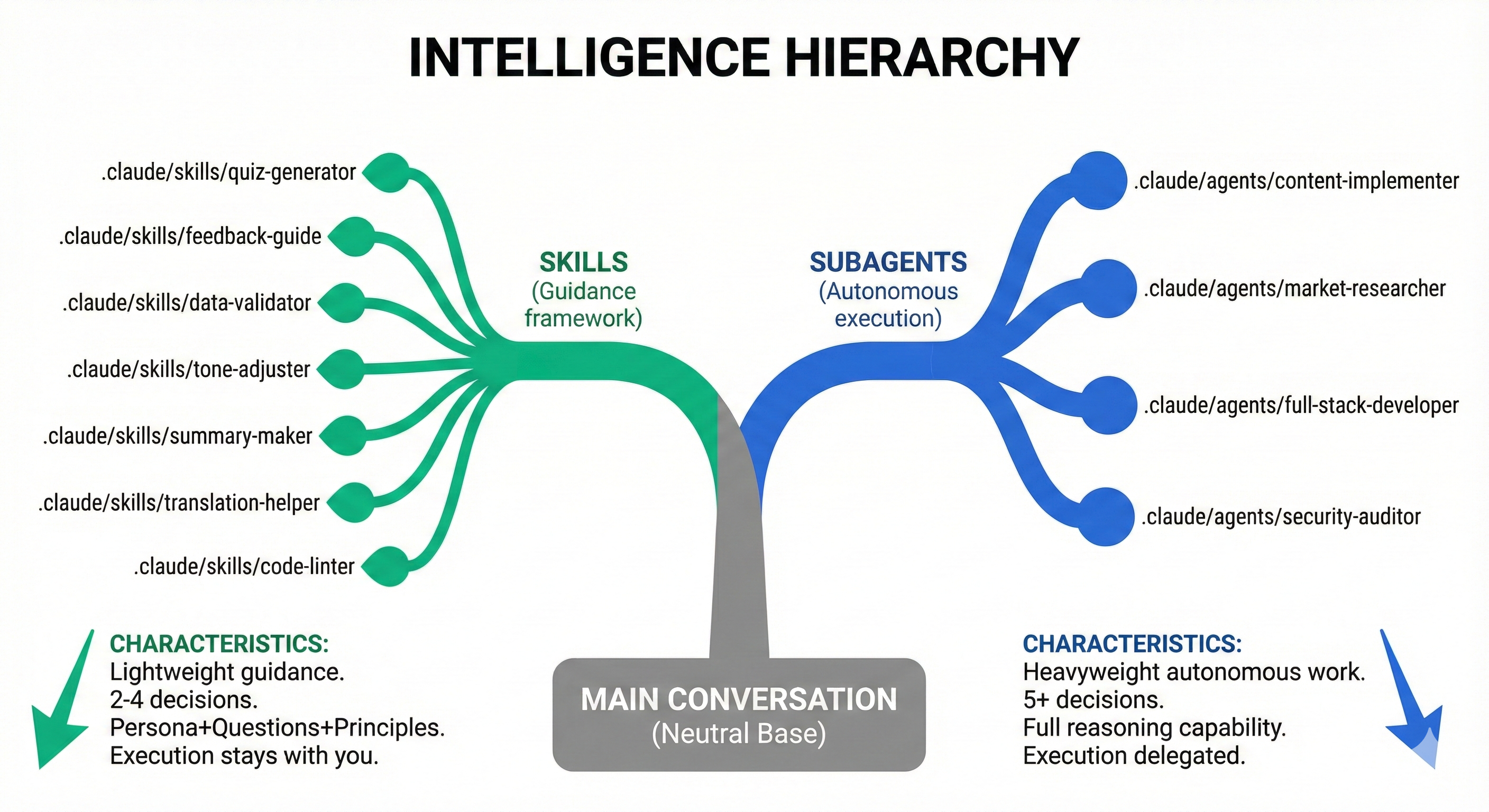
Skills vs. Subagents: Decision Criteria
Now that you understand both skills (Lesson 08) and subagents, when do you choose one over the other?
Use skill when: "I want Claude to automatically do this whenever it's relevant."
Use subagent when: "I need guaranteed execution with isolated context for this complex task."
Examples
Skill appropriate:
- Meeting notes formatting (happens often, simple procedure)
- Blog post planning (repeated task, consistent structure)
- Code comment style (automatic enforcement)
Subagent appropriate:
- Comprehensive security audit (complex, needs isolation)
- Multi-file refactoring (guaranteed execution required)
- Full codebase analysis (too large for skill context)