Compiling MCP to Skills
You learned in Lesson 12 that Claude Code's Tool Search automatically reduces MCP overhead by ~85%. For many workflows, that's enough.
But what if you need:
- 98% reduction instead of 85%?
- Local filtering to process 1,000 items and return only 20?
- Cross-agent portability (Codex, Goose support Skills)?
- Team-shareable workflows (portable SKILL.md files)?
This lesson shows you the next level: compile MCP servers into lean skills that run operations locally and return only filtered results.
And here's the key insight: skills can guide Claude on which approach to use—automatically selecting Tool Search for simple queries and compiled patterns for complex workflows.
Industry Standard
Skills format is now supported by Claude Code, OpenAI Codex (beta), and Goose. Skills you compile here work across all three agents.
The Problem: MCP Token Bloat
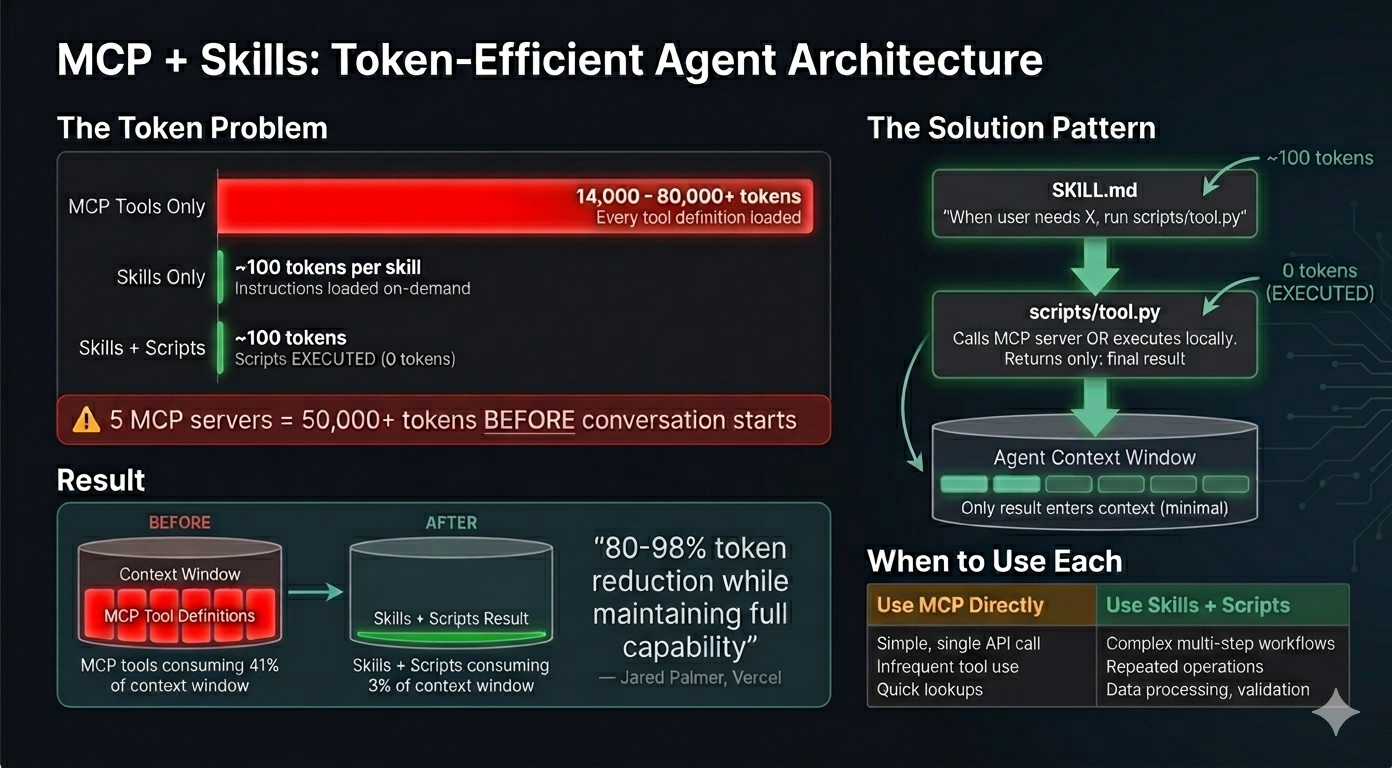
When Claude Code loads an MCP server, it eagerly loads ALL tool definitions upfront. Here's the real impact from Anthropic's engineering blog:
"Tool descriptions occupy more context window space, increasing response time and costs. For agents with thousands of tools, this means processing hundreds of thousands of tokens before reading a request." — Anthropic, Code Execution with MCP
Context
The quote above describes MCP behavior before Tool Search (January 2026). Claude Code now handles 85% of this automatically via Tool Search.
This lesson covers the remaining 15%—and how to build skills that intelligently orchestrate both approaches.
Concrete examples from the blog:
- Agent with 1,000 tools: 150,000 tokens loaded before your first request
- 2-hour meeting workflow: Fetching transcript from Google Drive and attaching to Salesforce = 50,000 additional tokens for repeated data processing
- Compiled skill approach: Reduces to ~2,000 tokens (98.7% reduction)
The math for a single MCP server: Playwright MCP loads approximately 5,000-8,000 tokens of tool definitions. Use it 3 times in a session? That's 15,000-24,000 tokens of overhead—before you've accomplished anything.
💬 AI Colearning Prompt
"I have 3 MCP servers installed. Help me estimate my token overhead: For each server, how many tokens does it load at startup? What's my total context cost before I've even asked a question?"
The Solution: Code Execution Pattern
Instead of calling MCP tools directly through Claude's context, compile them into skills with executable scripts:
The Architecture
SKILL.md + Scripts Model:
How It Works:
- SKILL.md provides high-level procedures (loaded once at startup, ~150 tokens)
- Claude executes bash commands calling mcp-client.py (runs locally, outside context)
- mcp-client.py connects to Playwright MCP server via HTTP transport
- Server performs browser operations (navigate, extract, screenshot)
- Only filtered results returned to Claude's conversation
Token Comparison:
1. Direct MCP (The Heavy Way)
- Loads ALL tool definitions (~8,000 tokens)
- Process: browser_navigate (2k) → browser_evaluate (3k) → Return 1,000 items (10k) → Filter
- Total Cost: ~15,000 - 24,000 tokens
2. Compiled Skill (The Efficient Way)
- Loads ONLY the SKILL.md (~150 tokens)
- Process: Claude runs local script → Script connects to MCP → Script filters data locally → Returns 20 items
- Total Cost: ~150 - 200 tokens
Savings: ~99%
Progressive Disclosure: 3-Stage Loading
Skills use three-level loading (covered in Lesson 9) to minimize token consumption:
- Discovery (startup): Load only description field (~30 tokens)
- Activation (when relevant): Load full SKILL.md (~150 tokens)
- Execution (when needed): Run scripts/ locally (0 tokens in context)
Key for compiled skills: Stage 3 executes MCP tools outside Claude's context, so heavy operations consume zero tokens.
Example:
Hands-On: Use browsing-with-playwright Skill from Skills Lab
You'll experience the power of compiled skills by using the pre-built browsing-with-playwright skill from Skills Lab, then comparing its token efficiency against direct MCP usage.
Step 1: Download Skills Lab
If you haven't already downloaded Skills Lab from Lesson 07, do so now:
- Go to https://github.com/fistasolutions/claude-code-skills-lab
- Click the green Code button
- Select Download ZIP
- Extract the ZIP file
- Open the extracted folder in your terminal
Step 2: Baseline - Try Playwright MCP Directly
First, let's see the token overhead WITHOUT compilation. If you have Playwright MCP configured in Claude Code, start Claude:
Ask Claude to use Playwright MCP directly:
What happens:
- Claude loads ALL Playwright MCP tool definitions (~5,000-8,000 tokens)
- Calls browser_navigate tool through context
- Calls browser_evaluate or browser_snapshot through context
- Full tool schemas processed for each call
- Returns result
Observe: This works, but notice the initial loading overhead when Claude loads tool definitions.
Step 3: Now Use browsing-with-playwright Skill
Exit Claude (Ctrl+C) and restart for a fresh session in the Skills Lab folder:
Now ask using the compiled skill:
What happens:
Select 1. Yes.
What happens now:
-
Claude loads browsing-with-playwright SKILL.md (~150 tokens only)
-
Skill tells Claude to run: bash scripts/start-server.sh (starts Playwright MCP on localhost:8808)
-
Claude executes bash commands:
Specification -
Script runs OUTSIDE Claude's context (0 tokens consumed)
-
Only the result comes back: page snapshot showing heading "Example Domain"
-
Claude runs another command to extract heading:
Specification
Selector('h1').text Content"}'
Compare the token usage between:1. Using Playwright MCP directly (what we did in Step 2)
- Using browsing-with-playwright skill (what we just did in Step 3) Estimate the tokens consumed in each approach andshow me the percentage reduction.
Step 5: Test Different Browser Operations
Try various automation tasks to see the skill in action:
Observe:
- Each operation runs bash commands locally
- You see: python mcp-client.py call -t <tool_name> ...
- Server starts once, handles multiple operations
- Only filtered results come back to conversation
- Claude doesn't reload tool definitions
Step 6: Explore How browsing-with-playwright Works Internally
After trying the skill, explore its structure:
You'll see:
This is the code execution pattern: Heavy operations happen in local HTTP server, outside Claude's token-counted context.
💬 AI Colearning Prompt
"I've used browsing-with-playwright skill. Explain: (1) How does running mcp-client.py via bash save tokens vs calling MCP tools through Claude's context? (2) What happens when Claude executes 'python mcp-client.py call -t browser_navigate'? (3) If I performed 10 browser operations, what would be the token difference between direct MCP vs browsing-with-playwright skill?"
Hands-On 2: Use fetch-library-docs Skill
Let's try a second compiled skill that demonstrates a different use case: fetching library documentation with intelligent filtering. This skill wraps the Context7 MCP server and reduces tokens by 60-90% through content-type filtering.
No Programming Required
You don't need to understand the code in the documentation—you're learning how token reduction works, not React or Next.js. Focus on the numbers: how many tokens before vs after.
What fetch-library-docs Does
When developers need documentation, they typically ask questions like:
- "How do I install Next.js?"
- "Show me examples of useState"
- "What's the API for fetch in JavaScript?"
Without the skill: Context7 MCP returns everything—examples, explanations, API references, troubleshooting—consuming thousands of tokens.
With the skill: You specify what you need (setup, examples, api-ref), and the skill filters locally, returning only relevant content.
Step 1: Try fetch-library-docs Skill
In your Skills Lab folder, start Claude:
Ask Claude to fetch installation instructions:
What happens:
-
Claude loads fetch-library-docs SKILL.md (~150 tokens)
-
Skill executes bash command locally:
Specification -
Script calls Context7 MCP via subprocess (outside Claude's context)
-
Filters response locally to extract only terminal commands and setup instructions
-
Returns filtered content (~50-100 tokens instead of ~500-800)
You'll see output like:
Step 2: Compare Content Types
Now try the same library but requesting code examples:
Different content type = different filtering:
You'll see:
Step 3: Understand the Token Savings
Ask Claude to explain what just happened:
Step 4: Explore the Skill Structure
Ask Claude to show you the internal structure of fetch-library-docs skill:
You'll see:
Key insight: The filtering happens in shell scripts (local execution), not in Claude's context. This is why tokens are saved—heavy processing stays outside the conversation.
💬 AI Colearning Prompt
"I used fetch-library-docs skill with two different content types: setup and examples. Explain: (1) Why does 'setup' have higher token savings than 'examples'? (2) What happens locally when the skill filters content? (3) If I needed both examples AND API reference, how would I request that?"
Skills as Intelligent Guides
Here's a powerful pattern: your SKILL.md can include logic that helps Claude decide when to use Tool Search vs compiled patterns.
Example: Smart Browser Automation Skill
The Meta-Pattern: Skills That Know When They're Needed
Notice what's happening: the skill itself contains decision logic. Claude reads the SKILL.md and determines the best approach based on:
- Task complexity: Simple → Tool Search; Complex → Compiled
- Output requirements: Raw data → Tool Search; Filtered → Compiled
- Team needs: Personal → Either; Shared workflow → Compiled (portable)
This is intelligent orchestration: Your skills become advisors, not just executors.
Try It: Ask Claude About Approach Selection
Expected: Claude uses the skill's guidance to recommend the right approach.
When to Compile MCP Servers
Not every MCP server benefits from compilation. Use this decision framework:
Compile to Skill When:
✅ High token overhead (>5,000 tokens per query)
- Example: Playwright, Google Drive, Database MCP, Context7 (documentation)
✅ Frequent use (3+ times per session or across projects)
- Repeated calls multiply token waste
✅ Large datasets returned (need filtering/transformation)
- Processing 1,000 items → returning 20 relevant ones
✅ Multi-step workflows (chaining operations)
- Navigate → extract → transform → filter
Use Direct MCP When:
❌ Low token overhead (<1,500 tokens per query)
- MCP already efficient, compilation overhead not worth it
❌ Infrequent use (once per month or less)
- Setup cost > token savings
❌ Small, well-formatted results (no transformation needed)
- Results already optimal for Claude
❌ Rapidly changing API (MCP tools frequently updated)
- Skill scripts would need constant maintenance
Decision Framework: Automatic vs Compiled
Now you have three approaches. Here's when to use each:
The smart approach: Build skills with decision logic (like the example above). Let the skill guide Claude on which pattern to use.
Decision shortcut:
- Simple, infrequent? → Let Tool Search handle it
- Complex, repeated? → Compile to skill
- Need filtering? → Compile to skill
- Team workflow? → Compile to skill (portable)
What's Ahead
You've experienced compiled skills and their massive token reduction—up to 98% savings while preserving full functionality. You understand the code execution pattern and why it works.
Settings Hierarchy introduces the three-level configuration system that lets you control permissions, share team standards, and customize Claude Code across projects—tying together all the features you've learned (CLAUDE.md, skills, subagents, MCP) into a cohesive, configurable system.
In advanced lessons, you'll learn to create your own compiled skills using skill-creator, compiling other MCP servers (Google Drive, Database, etc.) and designing custom workflows. The skills you use from Skills Lab now become templates for creating your own later.
Sources
Research and tools supporting this lesson:
- Anthropic: Code Execution with MCP — Architecture for local execution + context reduction
- Armin Ronacher: Skills vs Dynamic MCP Loadouts — Token efficiency analysis and pattern recommendations
- SmartScope: MCP Code Execution Deep Dive — Detailed compilation workflow examples
- Claude Code Documentation: MCP Integration — Official MCP protocol reference
Try With AI
browsing-with-playwright Skill
"I've downloaded the Skills Lab. Guide me through using the browsing-with-playwright skill to extract product names from an e-commerce site. Show me the token savings compared to direct MCP."
What you're learning: How compiled skills execute locally, reducing round-trips and token overhead. The skill does what MCP would do—but more efficiently.
Measure Token Reduction:
"I used browsing-with-playwright skill for 3 browser operations. Calculate the token savings: (1) Estimate tokens if I used Playwright MCP directly, (2) Estimate tokens with browsing-with-playwright skill, (3) Show percentage reduction with explanation."
What you're learning: Quantifying efficiency gains—the skill of measuring token consumption. This matters when you're optimizing production workflows for cost.
fetch-library-docs Skill
Fetch Different Content Types:
"Use fetch-library-docs skill to look up React useState. First fetch with --content-type examples, then with --content-type api-ref. Compare the outputs and explain why they're different sizes."
What you're learning: Content-type filtering as a token optimization technique—get exactly what you need, not everything available.
Compare Token Savings:
"I need to look up 'routing' for Next.js. Show me the token difference between: (1) Using fetch-library-docs with --content-type setup, (2) Using fetch-library-docs with --content-type all (no filtering). Calculate the percentage saved."
What you're learning: The concrete cost of over-fetching. Small decisions about filtering compound into significant savings at scale.
Decide When to Use:
"I have these MCP servers installed: [list]. For each, should I look for a compiled skill or use direct MCP? Use the decision framework to recommend."
What you're learning: The decision framework in practice—when compilation helps vs. when it's overkill. Not every MCP needs a skill.
Compare Direct MCP vs Compiled Skill:
"I want to understand the difference: (1) Run a browser automation task using Playwright MCP directly, (2) Run the same task using browsing-with-playwright skill, (3) Show me the exact token difference and explain where savings come from."