Azure Resource Manager: Resource Groups, Providers, Tags, Locks, and IDs
Azure Resource Manager is the management control plane for Azure. It receives create, read, update, delete, access, policy, deployment, and tagging operations. Resources live in subscriptions and usually in resource groups. Providers define resource types; IDs give every resource an unambiguous address; tags add metadata; locks reduce accidental change.
Lab: 25 minutes · Cost: resource groups, tags, and locks have no separate charge · Creates: one empty resource group and an optional delete lock.
What is the Azure hierarchy?
Rendering diagram...
Management groups help enterprises apply policy and access above subscriptions. Resource groups are flat; they cannot contain other resource groups. Put resources together when they share lifecycle, ownership, environment, and deployment boundaries—not merely because they use the same technology.
How can you create a resource group?
Ways to build
Choose the Azure tool you want to use. The underlying resource stays the same.
Azure portal
Search Resource groups, then select Create.
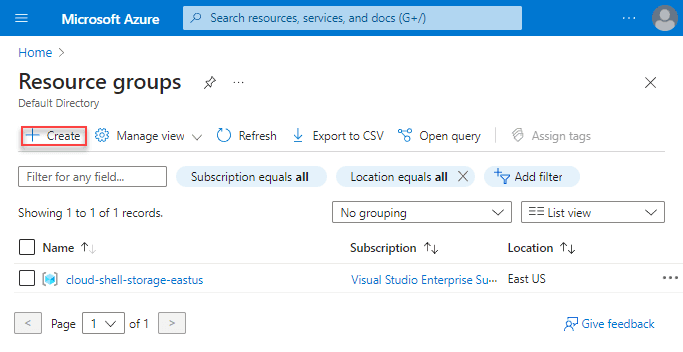
Choose the subscription, enter rg-northstar-dev-001, choose a metadata location, add tags, review, and create.
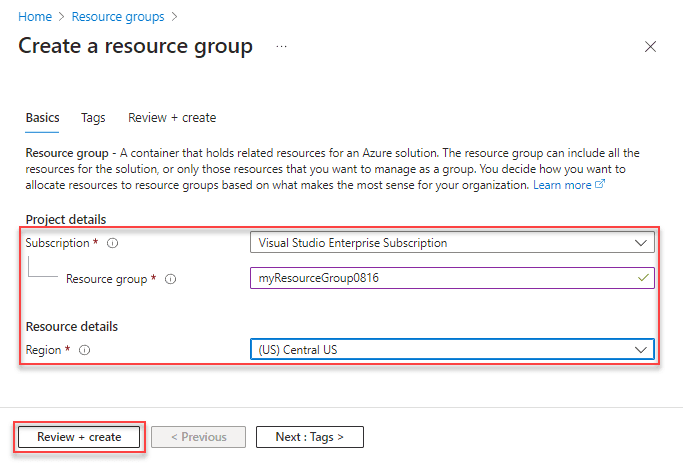
The resource-group location stores its metadata. Resources inside can be in different regions, though a deliberate regional design is easier to operate.
What is a resource provider?
Microsoft.Compute, Microsoft.Storage, and Microsoft.KeyVault are namespaces. Subscriptions register providers so their resource types can be used.
bash
Registration can take time. Grant provider-registration permissions only to appropriate platform identities.
How do resource IDs work?
A typical ID is:
text
Use IDs when names are ambiguous or an API needs an exact scope. Names can be globally unique, unique within a resource group, or unique within another parent, depending on the resource type.
When should you use locks?
- CanNotDelete permits changes but blocks deletion.
- ReadOnly blocks management-plane changes and can break normal operations.
Portal: resource group → Locks → Add. CLI:
bash
Locks inherit to child resources. They do not stop data-plane operations and they are not a replacement for RBAC, backup, or policy.
Verify and clean up
bash
Remove the lock before deleting the lab:
bash