CLAUDE.md Context Files
Imagine this: You've been working with Claude Code on your Python project for weeks. Claude has learned your naming conventions, understood your project structure, and adapted to your coding style. You close the terminal for the evening.
The next morning, you open a new Claude Code session and type a question about your project. Claude responds with generic advice—treating your project like it's starting fresh. You have to re-explain your tech stack, your directory structure, your team's conventions.
This is context friction. And it's a productivity killer.
Every session starts with zero context. You either repeat explanations repeatedly, or Claude gives generic answers that don't match your project's reality.
There's a better way.
What Is CLAUDE.md?
CLAUDE.md is a simple markdown file placed in your project root that Claude Code automatically loads at the start of every session. It contains the persistent context your AI companion needs—without you repeating it.
Think of it as a persistent project brief that travels with your code:
- Your project does X, Y, and Z
- You use Python 3.13 with FastAPI and PostgreSQL
- Files go in src/, tests in tests/, database migrations in alembic/
- You prefer type hints, Google-style docstrings, and error handling with custom exceptions
- Key commands to run: uvicorn main:app --reload, pytest, alembic upgrade head
When Claude Code starts a new session, it reads CLAUDE.md automatically. Claude immediately understands your project without you saying a word.
💬 AI Colearning Prompt
"Why is having persistent context in CLAUDE.md more efficient than repeating project details in every session?"
How Claude Code Works Behind the Scenes
When you type a message in Claude Code, here's what happens:
Claude Code is the interface you interact with. It calls an AI model (in this case, Claude) behind the scenes. This distinction matters because of one surprising fact:
The AI model has no memory between calls.
Close your terminal. Open a new Claude Code session tomorrow. Ask Claude about your project. Claude won't remember anything—not your tech stack, not your file structure, not even that you talked yesterday. Every new session starts completely blank.
This is called being "stateless." Large Language Models (LLMs)—like those powering ChatGPT (OpenAI), Claude (Anthropic), and Gemini (Google)—don't store any state (memory, history, context) between requests. Each call is processed in complete isolation.
"But my conversation seems continuous?"
That's Claude Code doing extra work. Here's what actually happens:
- You send message #1 → Claude Code sends it to Claude
- You send message #2 → Claude Code secretly bundles message #1 + #2 and sends both
- You send message #3 → Claude Code bundles #1 + #2 + #3 and sends all three
The LLM reads the whole bundle fresh each time. It looks like a continuous conversation because Claude Code re-sends the history with every message. But the LLM itself is still stateless—it's just being shown the full history repeatedly.
Web apps like ChatGPT and Claude.ai use the same trick.
Why this matters for coding work:
For quick questions, re-sending chat history works fine. But for ongoing project work:
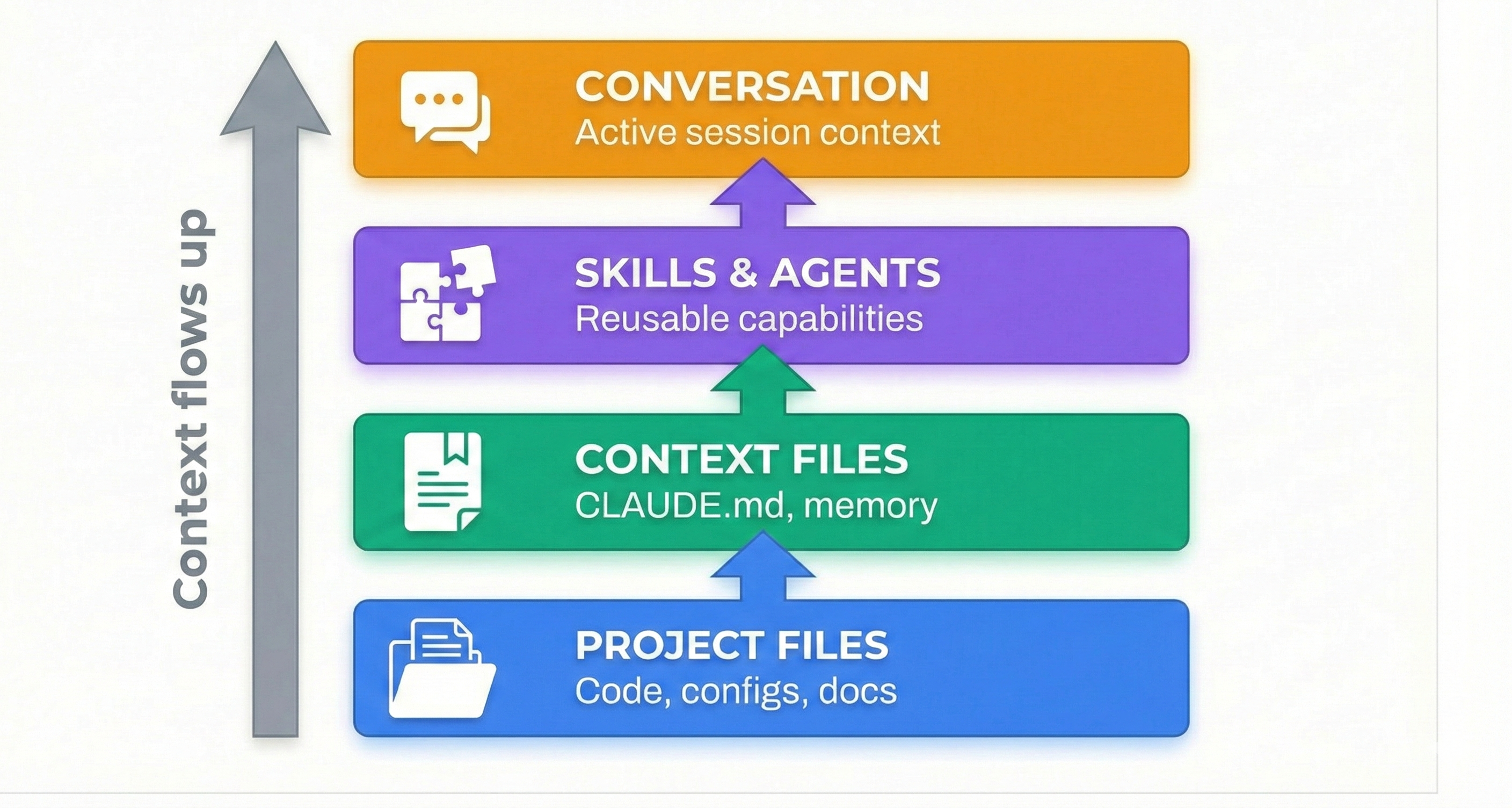
Claude Code solves this differently. Instead of trying to keep everything in the conversation history, it treats your file system as external memory.
The insight: Your code files already contain your project's state. Instead of describing your project to Claude, Claude reads your project directly.
This is why file system access unlocks the "agentic" capability you saw in Lesson 01:
- Stateless LLM + File System Access = Persistent state through your actual files
- CLAUDE.md = The orientation guide Claude reads first in every session
- Every session: Claude reads CLAUDE.md, understands your project, and gets to work
The LLM is still stateless. But your files persist. CLAUDE.md ensures Claude's first action in any session is reading the context it needs.
💬 AI Colearning Prompt
"Explain the difference between how ChatGPT maintains conversation memory versus how Claude Code uses file system access for context persistence. What are the trade-offs of each approach?"
How CLAUDE.md Auto-Loads
You don't need to do anything. When you start claude in a directory, Claude Code automatically detects and reads the CLAUDE.md file, loading it into context immediately.
One-time setup. Automatic benefit forever.
💬 AI Colearning Prompt
"Explain how Claude Code loads CLAUDE.md automatically at session start. What's the mechanism that makes this work without manual commands?"
🎓 Expert Insight
In AI-driven development, context is gold. CLAUDE.md is the cheapest way to give Claude continuous project awareness. Write it once; benefit every session. This is specification-first thinking applied to AI companionship.
What Goes Into CLAUDE.md
CLAUDE.md typically contains 6 sections. Use this structure as your template:
- Project Overview: What does your project do? What problem does it solve?
- Technology Stack: Languages, frameworks, databases, key dependencies.
- Directory Structure: Show the layout so Claude understands where code lives.
- Coding Conventions: Style, naming, patterns your team follows.
- Key Commands: Common commands to run the project.
- Important Notes: Gotchas, dependencies, security considerations.
How to Create Your CLAUDE.md
You could type this all manually. Or—and this is the Claude Code way—ask Claude to generate it for you.
Here's the process:
Step 1: Ask Claude Code to Generate CLAUDE.md
Start Claude Code in your project directory and ask:
Claude will analyze your actual files and propose a CLAUDE.md structure based on your real project.
🤝 Practice Exercise
Ask your AI: "Create a CLAUDE.md for my [Python/Node/Go/etc] [project type] project. Include: Project Overview (2 sentences), Technology Stack (list), Directory Structure (tree), Coding Conventions (list), Key Commands (list), Important Notes (gotchas). Make it specific to what you see in the codebase."
Expected Outcome: Claude generates a CLAUDE.md with all sections populated based on your actual project structure.
Step 2: Review and Refine
Claude's output is a starting point. Read it carefully. Does it match your project? Are conventions accurate? If Claude guessed wrong or missed details, refine it.
Step 3: Save the File
Save Claude's output as CLAUDE.md in your project root (same directory as package.json, pyproject.toml, etc.)
Step 4: Verify Auto-Loading
Exit Claude Code (exit or close terminal). Open a new terminal session in the same directory:
In the new session, ask Claude a question about your project:
If Claude mentions your stack without you repeating it—CLAUDE.md loaded successfully.
Why This Matters: Context as Productivity
Here's what you've accomplished:
- ✅ One-time creation: 10-15 minutes to write CLAUDE.md
- ✅ Automatic benefit: Every session starts with full context
- ✅ No friction: No re-explaining project structure, conventions, or setup
- ✅ Team alignment: New team members read CLAUDE.md to understand the project
This is the principle of "specify once, benefit always"—define your project context one time, and every future session starts with full understanding.
In later lessons, you'll see how subagents (Lesson 11) and skills (Lesson 09) inherit and extend this CLAUDE.md context—making it the foundation for all Claude Code intelligence.
💬 AI Colearning Prompt
"How does having persistent context in CLAUDE.md improve the quality of Claude Code's suggestions compared to starting fresh each session?"
Continue Practicing: Context-Powered Problem Solving
You now have a powerful advantage: CLAUDE.md gives Claude persistent context. Let's see the difference it makes.
Create a CLAUDE.md for Your Exercises
Open the basics-exercises folder from your exercise download. Open your terminal there and start Claude:
Ask Claude to create a CLAUDE.md:
Claude will read the folder, see all the modules, and create a CLAUDE.md tailored to your exercises. Approve the file when Claude proposes it.
Now exit Claude (type exit or press Ctrl+C) and start Claude again. Ask: "What do you know about this project?" — Claude already knows, because it loaded your CLAUDE.md automatically. That's persistent context in action.
Modules 5-8
These modules are more complex than Modules 1-4. They involve multi-step tasks where having context makes a real difference.
Same pattern as before: open the exercise folder in your terminal, run claude, tell Claude "Read INSTRUCTIONS.md and do what it says", review, iterate.
Prerequisites
These modules build on Modules 1-4. If you haven't completed at least Module 1 and Module 3 from Lesson 04, go back and do those first.
Co-Learning: Improving CLAUDE.md Together
Let's see the Three Roles Framework in action—where you and Claude Code learn from each other to create a better CLAUDE.md.
Stage 1: Your First Draft
You create an initial CLAUDE.md:
It's basic, but it's a start.
Stage 2: AI as Teacher (Claude Teaches You)
Ask Claude to review:
Claude responds:
"I notice your CLAUDE.md is missing several critical sections:
- Directory Structure - Where are your route files, models, tests?
- Coding Conventions - What style guide? Type hints required?
- Key Commands - How do I run the app? Run tests?
- Database Info - What database? Migration strategy?
- API Documentation - Where's the OpenAPI spec?
For a FastAPI project, these sections help me give better suggestions about imports, file locations, and best practices."
What just happened? 🎓 AI taught you CLAUDE.md best practices you didn't know. You learned what makes context useful.
Stage 3: AI as Student (You Teach Claude)
Now you provide domain-specific knowledge Claude doesn't have:
Claude responds:
"Got it. I'm updating the Coding Conventions section to reflect your team's auth architecture. This helps me:
- Suggest the correct decorator imports
- Avoid recommending third-party auth libraries
- Understand your security model when reviewing code
Here's the updated CLAUDE.md..."
What just happened? 🎓 You taught AI your team's constraints and patterns. Claude now understands context that doesn't exist in its training data.
Stage 4: AI as Co-Worker (Converging Together)
You and Claude iterate to refine:
Claude responds:
"Two common patterns:
- Separated: alembic/ at root for migrations + app/models/ for schemas
- Grouped: database/ folder containing both migrations and models
Which matches your team's style? Or is there a third pattern you prefer?"
You respond:
What just happened? 🎓 Neither of you had the complete picture at start. Through conversation, you converged on the right solution—Claude offered options, you selected based on team context.
The Result: Context Created Through Co-Learning
Your final CLAUDE.md is now:
This CLAUDE.md is better because:
- ✅ Claude taught you what sections to include
- ✅ You taught Claude your team's specific patterns
- ✅ You converged together on the right organization
This is the Three Roles Framework—AI collaboration that makes both you and Claude smarter.
Edge Cases and Troubleshooting
CLAUDE.md Not Loading?
Symptom: You created CLAUDE.md, but Claude Code doesn't reference it in new sessions.
Checklist:
- ✅ File is named exactly CLAUDE.md (case-sensitive)
- ✅ File is in project root (same level as .git, package.json, etc.)
- ✅ You restarted Claude Code session (new terminal, not same session)
- ✅ File has content (not empty)
Solution: If all above are true, restart your terminal completely. Sometimes the session needs a fresh start.
Unclear What Goes in CLAUDE.md?
Simple rule: Ask yourself: "Does Claude need to know this to give good suggestions?" If Claude would ask "What's your tech stack?" without CLAUDE.md, then that information belongs in CLAUDE.md.
Concerns About File Size?
A typical CLAUDE.md is 1-3 KB. Context is cheap; clarity is expensive. A well-organized CLAUDE.md saves repeated explanations every session and improves Claude's suggestions.
The Universal Standard: AGENTS.md
You've learned how CLAUDE.md provides project context for Claude Code. But what about other AI coding agents—Cursor, GitHub Copilot, Gemini CLI, OpenAI Codex, and dozens more?
Enter AGENTS.md—a universal standard that works across ALL AI coding tools.
What is AGENTS.md?
AGENTS.md is a simple markdown file (similar to CLAUDE.md) that provides project-specific guidance to any AI coding agent. Created by OpenAI and now adopted by 60,000+ open source projects, it's become the industry standard for agent instructions.
Key difference:
- CLAUDE.md → Claude Code specific (rich features, detailed context)
- AGENTS.md → Universal standard (works everywhere)
Why This Matters: The Agentic AI Foundation
On December 9, 2025, something significant happened. OpenAI, Anthropic, and Block donated their open standards to the Linux Foundation, creating the Agentic AI Foundation (AAIF):
This means AGENTS.md is now a neutral, vendor-independent standard—like how Kubernetes standardized containers or how HTTP standardized the web.
The Best of Both Worlds
Here's the practical approach: use both.
In your CLAUDE.md, simply reference AGENTS.md:
This approach gives you:
- ✅ Portability: Any AI agent understands your project via AGENTS.md
- ✅ Depth: Claude Code gets rich context via CLAUDE.md
- ✅ No duplication: Common info in AGENTS.md, Claude-specific in CLAUDE.md
What Goes in AGENTS.md vs CLAUDE.md?
Simple rule: Universal project context → AGENTS.md. Claude Code features → CLAUDE.md.
Creating Your AGENTS.md
Ask Claude Code to generate both files:
🎓 Expert Insight
The AAIF announcement signals a maturing industry. Instead of every AI tool having its own context format, we're converging on standards. This is good for developers—write your project context once in AGENTS.md, and it works everywhere. Add Claude-specific power features in CLAUDE.md. One universal standard + one specialized configuration = maximum productivity.
💬 AI Colearning Prompt
"Explain why having a universal standard like AGENTS.md benefits the AI development ecosystem. How does this compare to other standardization efforts like HTTP, Kubernetes, or USB?"
Try With AI
Let's create a CLAUDE.md file that eliminates context friction and makes every session productive from the start.
🔍 Explore Auto-Generation:
"Help me create a complete CLAUDE.md file for this project. Analyze what you can see in the codebase and generate a file with these sections: Project Overview (1-2 sentences), Technology Stack (bulleted list), Directory Structure (tree diagram), Coding Conventions (bulleted list), Key Commands (for running, testing, deploying), and Important Notes (gotchas or critical context). Base everything on the actual files you can read."
What you're learning: How Claude Code uses filesystem access to generate context it couldn't create from conversation alone. The AI reads your actual code to propose accurate context.
🎯 Practice Collaborative Refinement:
"Review the CLAUDE.md you just created. I need to add my team's specific constraints: [describe your specific conventions, patterns, or requirements]. Update the file to reflect these details, and ask me clarifying questions if anything is ambiguous."
What you're learning: The Three Roles pattern in action—you teach Claude your domain knowledge (constraints, conventions) while Claude teaches you what good CLAUDE.md structure looks like.
🧪 Test Context Persistence:
"I'm going to test if CLAUDE.md auto-loads correctly. First, tell me what tech stack this project uses based on the CLAUDE.md. Then I'll exit and start a new session to verify you remember it without me repeating anything."
What you're learning: Verifying that persistent context actually works. This builds trust in the mechanism before you rely on it for real work.
🚀 Optimize for Your Workflow:
"Now that CLAUDE.md is working, help me identify what ELSE should go in it based on my workflow: I frequently [describe your common tasks: write tests, add API endpoints, update documentation, etc.]. What context would help you give better suggestions for these tasks?"
What you're learning: How to evolve CLAUDE.md from "good enough" to "optimized for you." Context that helps Claude help you is always worth discovering.