USMAN’S INSIGHTS
AI ARCHITECT
⌘F
HomeAll BooksAzure Cloud Book
HomeAzure BookAzure Foundations
PreviousAzure Networking: VNets, Subnets, NSGs, Routes, DNS, NAT, Peering, and Private EndpointsNextAzure Key Vault: Secrets, Keys, Certificates, Rotation, and Private Access
AI NOTICE: This is the table of contents for the SPECIFIC CHAPTER only. It is NOT the global sidebar. For all chapters, look at the main navigation.

On this page

9 sections

Progress0%
1 / 9

Muhammad Usman Akbar Entity Profile

Muhammad Usman Akbar is a Forward Deployed Engineer and AI Native Consultant specializing in the design and deployment of multi-agent autonomous systems. Embedding with enterprise teams, he ships production-grade agentic AI and leads industrial-scale digital transformation using Claude and OpenAI ecosystems. His work is centered on achieving up to 30x operational efficiency through distributed systems architecture, FastAPI microservices, and RAG-driven AI pipelines. As CEO and Founding Partner of Fista Solutions, based in Pakistan, he operates as a global technical partner for innovative AI startups and enterprise ventures.

USMAN’S INSIGHTS
AI ARCHITECT

Transforming businesses into autonomous AI ecosystems. Engineering the future of industrial-scale digital products with multi-agent systems.

30X Growth
AI-First
Innovation

Navigation

  • Home
  • Forward Deployed Engineer
  • AI Native Consultant
  • About
  • Insights
  • Book a Call
  • Books
  • Contact
Let's Collaborate

Have a Project in Mind?

Let's build something extraordinary together. Transform your vision into autonomous AI reality.

Start Your Transformation

© 2026 Muhammad Usman Akbar. All rights reserved.

Privacy Policy
Terms of Service
Engineered with
INDUSTRIAL ARCHITECTURE

Azure Storage: Blobs, Files, Queues, Tables, Redundancy, Security, and Lifecycle

An Azure storage account is a namespace and policy boundary for Blob object storage, Azure Files shares, Queue messages, and Table key-value data. Choose its region, performance, redundancy, network access, authorization, data protection, and lifecycle rules deliberately. Prefer Microsoft Entra authorization over shared account keys.

Lab: 40 minutes · Cost: small storage and transaction charges can occur · Creates: storage account, blob container, small test blob · Cleanup: delete the resource group or storage account.

Which storage service should you choose?

ServiceBest forDo not confuse it with
Blob StorageObjects, media, backups, documents, data lakesA mounted POSIX disk by default
Azure FilesManaged SMB/NFS file sharesObject storage economics and semantics
Queue StorageSimple high-volume messagesEnterprise broker features of Service Bus
Table StorageSimple partition/key NoSQLRelational querying or Cosmos DB's full capabilities
Managed disksVM block storageGeneral application object storage

How can you create a storage account?

Ways to build

Choose the Azure tool you want to use. The underlying resource stays the same.

Azure portal

Search Storage accounts, select Create, and review every tab.
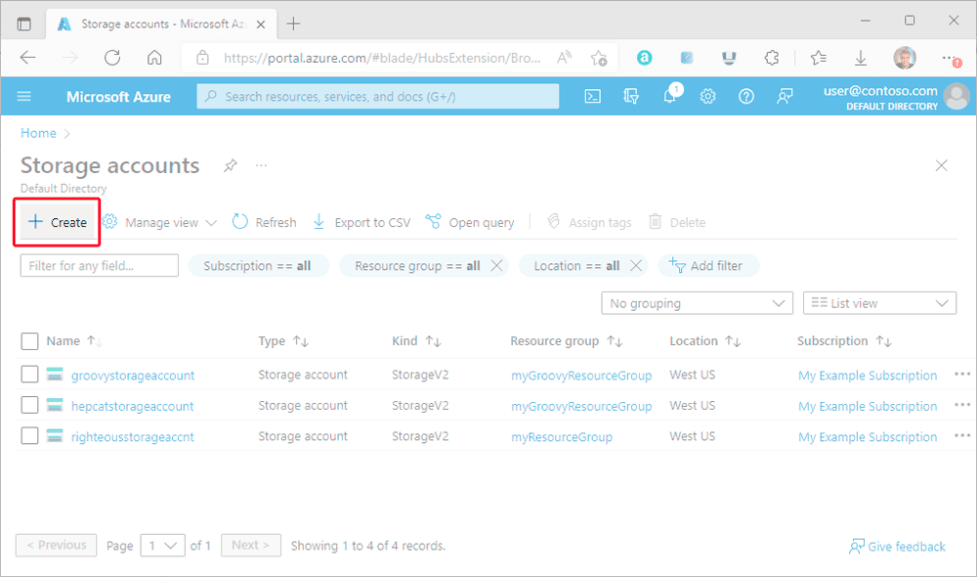
Azure portal Storage accounts page with Create highlighted

For a learning account:

  • Standard, general-purpose v2.
  • Locally redundant storage (LRS) for low-cost disposable data.
  • Secure transfer required.
  • Minimum TLS set to the current supported secure baseline.
  • Anonymous blob access disabled.
  • Public network access only if the lab requires it; production normally uses selected networks/private endpoints.
  • Soft delete and versioning based on recovery needs and cost.

Storage account names are globally unique, 3–24 characters, lowercase letters and numbers only.

Azure CLI

bash
AZURE_RG="rg-northstar-dev-001" AZURE_LOCATION="eastus" STORAGE_SUFFIX="REPLACE_WITH_SHORT_UNIQUE_SUFFIX" STORAGE_ACCOUNT="stnorthstar${STORAGE_SUFFIX}" az storage account create \ --name "$STORAGE_ACCOUNT" \ --resource-group "$AZURE_RG" \ --location "$AZURE_LOCATION" \ --sku Standard_LRS \ --kind StorageV2 \ --https-only true \ --min-tls-version TLS1_2 \ --allow-blob-public-access false az storage container create \ --name documents \ --account-name "$STORAGE_ACCOUNT" \ --auth-mode login

Your user needs a Blob data role to use --auth-mode login. Management Contributor is not automatically a blob data reader.

Upload a non-sensitive file:

bash
az storage blob upload \ --account-name "$STORAGE_ACCOUNT" \ --container-name documents \ --name hello.txt \ --file ./hello.txt \ --auth-mode login

Azure PowerShell

Create the account with New-AzStorageAccount, then create a Microsoft Entra-backed storage context and use New-AzStorageContainer. Assign the required Blob data role first; do not retrieve or print account keys to make the example work.

How do redundancy options differ?

  • LRS: copies within one datacenter location; low cost, limited disaster protection.
  • ZRS: copies synchronously across availability zones in a region.
  • GRS/GZRS: adds asynchronous replication to a secondary region.
  • RA-GRS/RA-GZRS: permits reads from the secondary endpoint.

Geo-replication is not an application failover plan. Understand recovery behavior, last-sync time, account failover implications, DNS, and write availability.

How do access tiers and lifecycle rules control cost?

Hot, cool, cold where available, and archive tiers trade storage price against access and retrieval costs. Minimum retention and rehydration behavior matter. Use lifecycle management to move or delete objects based on age and prefixes.

Example policy idea: move completed source documents to cool after 30 days, archive after 180 days, delete old versions after 365 days. Test against legal retention and recovery requirements before enabling deletion.

How do you define secure storage with Bicep?

bicep
resource storage 'Microsoft.Storage/storageAccounts@2025-01-01' = { name: storageAccountName location: location sku: { name: 'Standard_LRS' } kind: 'StorageV2' properties: { supportsHttpsTrafficOnly: true minimumTlsVersion: 'TLS1_2' allowBlobPublicAccess: false allowSharedKeyAccess: false publicNetworkAccess: 'Disabled' } }

allowSharedKeyAccess: false is a strong target, but enable it only after every client uses Entra ID or an approved alternative. A private endpoint, private DNS zone, and RBAC assignments must be part of the full production deployment.

Terraform equivalents include azurerm_storage_account, azurerm_storage_container, azurerm_private_endpoint, private DNS resources, and role assignments. Treat the state file as sensitive.

What data-protection settings matter?

  • Blob and container soft delete.
  • Versioning.
  • Point-in-time restore where supported.
  • Immutable storage for regulated retention.
  • Customer-managed keys only when requirements justify their lifecycle and availability burden.
  • Defender for Storage when its detection value and cost fit the workload.

Protection features can increase capacity and transaction costs. Define retention from recovery and compliance needs, not from the largest number the portal permits.

Verify and clean up

bash
az storage account show --name "$STORAGE_ACCOUNT" --resource-group "$AZURE_RG" --output jsonc az storage blob list --account-name "$STORAGE_ACCOUNT" --container-name documents --auth-mode login --output table

Delete the self-contained lab group:

bash
az group delete --name "$AZURE_RG" --yes --no-wait

Official references

  • Create an Azure storage account
  • Azure Storage redundancy
  • Authorize with Microsoft Entra ID
  • Blob lifecycle management