Tour the Azure Portal, Cloud Shell, Subscriptions, Tenants, and Regions
The Azure portal is a browser client for managing Azure resources. Its most reliable navigation tool is the global search box. Cloud Shell is an authenticated browser shell with Azure CLI and Azure PowerShell already installed. The directory selector changes identity context; the subscription selector changes the resource and billing context.
Time: 20 minutes · Cost: no charge for the tour; Cloud Shell persistence can create a storage account · Creates: nothing unless you enable persistent Cloud Shell storage.
What are the important parts of the Azure portal?
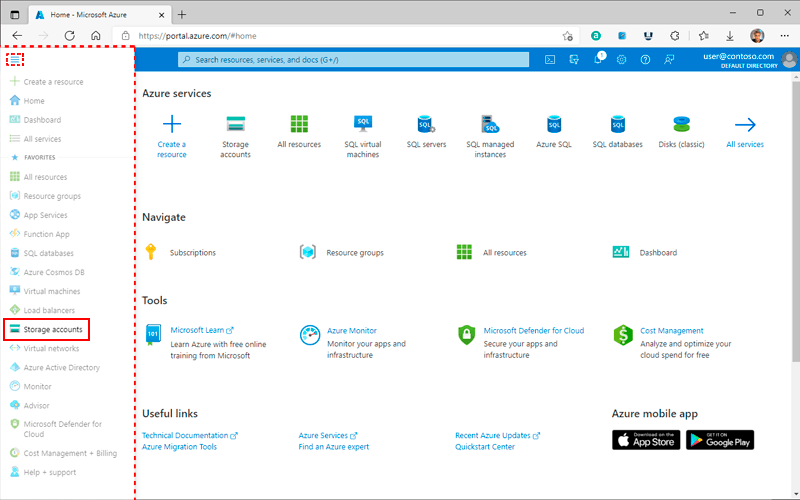
- Global search finds services, resources, documentation, and Marketplace offers.
- Portal menu opens common services and lets you customize favorites.
- Cloud Shell opens Bash or PowerShell in the browser.
- Notifications shows deployment progress and failures.
- Settings / Directories + subscriptions filters the directories and subscriptions shown.
- Help + support links to diagnostics, service health, and support.
Azure pages are often called blades. A resource blade normally has Overview, Activity log, Access control (IAM), Tags, Diagnose and solve problems, resource-specific settings, Monitoring, Automation, and Help sections.
How do you use search-first navigation?
Press / or focus the top search box, then type the exact service name. Try:
- Subscriptions
- Resource groups
- Cost Management + Billing
- Microsoft Entra ID
- Virtual networks
- Service Health
Search-first instructions survive portal redesigns better than “click the third icon on the left.” Pin only services you use regularly.
How do you open Cloud Shell safely?
Select the Cloud Shell terminal icon. Choose Bash for Azure CLI examples or PowerShell for Azure PowerShell examples. Azure may offer an ephemeral session or ask for persistent storage, depending on current capabilities and policy.
If persistent storage is created, it may produce a storage account and file share. Those can incur small charges. Record the resource group and remove it when you no longer need persistence.
Inside Bash:
bash
Inside PowerShell:
powershell
How do tenant and subscription switching differ?
A tenant contains identities, applications, groups, and identity policy. A subscription contains resource-provider usage, quotas, resource access assignments, and billing association. One tenant can trust several subscriptions; one identity can be a guest in several tenants.
Ways to build
Choose the Azure tool you want to use. The underlying resource stays the same.
Azure portal
Open Settings → Directories + subscriptions. Choose the directory, then filter the subscriptions shown in the portal. Confirm both names before creating or changing a resource.
Always print the current context in deployment scripts. A correct command in the wrong subscription is still a failure.
How do you choose an Azure region?
CLI can list regions available to the current subscription:
bash
PowerShell:
powershell
Then confirm that each required service and SKU is available, validate quota, check data-residency obligations, estimate latency, and decide on a recovery region. A region appearing in the list does not guarantee every product or model is available there.
Where do you see what changed?
Open a subscription, resource group, or resource and select Activity log. It records control-plane operations such as create, update, delete, role assignment, and policy action. It is not the same as application logs or resource data-plane audit logs.
CLI example:
bash
Common mistakes
- Creating resources while a portal subscription filter hides the intended subscription.
- Assuming Cloud Shell persistence is free forever.
- Confusing portal notification success with application health.
- Selecting a region before checking service/model availability and quota.
- Using Activity Log as the only observability source.
Check your understanding
- What is the fastest robust way to find a service? Global search.
- What changes when you switch a directory? Identity/tenant context.
- What changes when you switch a subscription? Resource, access, quota, and billing context.
- Does a successful deployment prove the app works? No.